
AI-assisted development can help a team turn an idea into working software faster than ever.
That speed is useful. It can shorten early experiments, help teams test assumptions, and reduce the time needed to create a prototype.
But a working prototype is not the same as production-ready software.
The difference becomes clear when the application meets its first real customer, connects to a critical system, handles sensitive data, or goes through a security review.
At that point, the important question changes.
The question is no longer, “Can AI build this?”
The question becomes, “Can the business operate, secure, support, and trust what was built?”
This article expands on a topic I first shared on LinkedIn, with additional guidance for leaders evaluating AI-built applications.
AI Changes Development Speed, Not Business Responsibility
Tools such as AI coding assistants can generate screens, workflows, database structures, and application logic in a fraction of the time traditional development may require.
That does not remove the need for:
- Clear requirements
- Technical architecture
- Security controls
- Data governance
- Testing
- Documentation
- Monitoring
- Support
- An accountable owner
Those responsibilities still exist.
When nobody addresses them early, they often return later as rework, outages, security gaps, failed integrations, and growing maintenance costs.
Fast code without clear ownership is simply faster risk.
Why the Demo Can Create False Confidence
A demo usually proves that the application works under controlled conditions.
It may show that:
- A form can collect information
- A dashboard can display results
- A workflow can move from one step to another
- An AI feature can produce a useful response
- A user can complete a basic task
That is valuable, but limited.
A demo rarely proves how the application will behave when hundreds of people use it, when a vendor API changes, when data is incomplete, or when someone receives the wrong level of access.
It also may not answer what happens when the application fails.
Production software must handle normal use, unusual use, mistakes, outages, updates, security events, and changing business requirements.
That is where many quick builds begin to show their true cost.
Where AI-Built Applications Commonly Run Into Trouble
1. The architecture was never defined
Some applications grow one prompt at a time.
A feature is added. Then another feature. Then a database connection. Then an integration. Each part works by itself, but no one has planned how the full system should operate.
This can lead to duplicated logic, fragile dependencies, poor performance, and limited options for future growth.
Architecture does not need to be complicated. It needs to be intentional.
2. Security was treated as a final review
Security decisions begin with the first design choice.
Leaders should know:
- What information the application collects
- Where that information is stored
- Who can view or change it
- How access is granted and removed
- What activity is logged
- How vulnerabilities will be addressed
Adding these controls after launch is usually more difficult and expensive than including them from the start.
3. Integrations were tested only under ideal conditions
An application may work well until it connects to a payment platform, customer database, clinical system, reporting tool, or vendor service.
Integrations fail for many ordinary reasons:
- A field changes
- A service becomes unavailable
- Credentials expire
- Data arrives in an unexpected format
- Two systems update the same record differently
A dependable application needs a plan for detecting, reporting, and recovering from those failures.
4. Testing focused only on the expected path
A successful test often confirms that the application works when the user does everything correctly.
Real users do not always follow the expected path.
They skip fields, upload the wrong files, click twice, lose their connection, use an older browser, or misunderstand an instruction.
Testing should include normal activity, mistakes, edge cases, security scenarios, and recovery steps.
5. Nobody planned for ongoing support
Every production application becomes an operational responsibility.
Someone will need to:
- Review alerts
- Respond to incidents
- Manage user access
- Update integrations
- Fix defects
- review security findings
- Maintain documentation
- Evaluate new requests
The application may have been inexpensive to generate. That does not mean it will be inexpensive to operate.
Seven Questions to Ask Before Approving an AI-Built App
Business leaders do not need to review every line of code. They do need clear answers to the following questions.
1. Who owns the technical outcome?
Name the person accountable for architecture, security, reliability, and major technical decisions.
A tool cannot fill this role.
2. What business process does the application support?
Define the problem, the intended users, and the measurable result.
Without that clarity, teams may build features quickly without solving the right problem.
3. What information will the application handle?
Identify whether the system will collect customer information, employee records, financial data, health information, credentials, or other sensitive content.
The data should determine the level of security and governance required.
4. How will access be controlled and reviewed?
Confirm how users sign in, what each role can do, how access changes are recorded, and how former employees or contractors are removed.
5. What must be tested before launch?
Set clear requirements for functional testing, security testing, integration testing, performance, recovery, and user acceptance.
“Works on my laptop” is not a launch standard.
6. Who supports the application after launch?
Assign responsibility for monitoring, incidents, updates, user questions, and vendor changes.
Also define when an issue should be escalated and who has the authority to stop or roll back a release.
7. What happens if the platform changes?
Some AI development tools rely on proprietary platforms, hosted services, or generated components that may be difficult to move.
Leaders should understand how data, code, and documentation can be exported if the organization needs to change direction.
The Risk Is Higher in Regulated Industries
In healthcare, finance, and education, an application may affect far more than productivity.
It may handle protected health information, financial records, student data, regulated communications, or evidence needed during an audit.
A quick internal application can become a compliance concern when it begins processing real information.
Leaders should involve security, privacy, compliance, operations, and the people who use the process before the application reaches production.
The goal is not to slow every idea down.
The goal is to match the review process to the level of business risk.
A small internal calculator does not need the same controls as an application that stores patient information or moves money. But the decision should be deliberate, documented, and owned.
A Better Way to Use AI in Software Delivery
AI works best when it accelerates a defined delivery process rather than replacing one.
A practical approach includes six steps:
- Define the business outcome and intended users.
- Assign an accountable business and technical owner.
- Establish architecture, data, access, and security requirements.
- Build and test the smallest useful version.
- Plan monitoring, support, recovery, and future changes.
- Document the decisions needed to operate the application.
This approach allows a team to gain the speed of AI without treating production readiness as cleanup work.
AI has reduced the effort required to generate software.
It has not removed the effort required to run software responsibly.
Leaders should welcome faster experiments and better development tools. They should also make sure that speed does not bypass the controls that protect customers, employees, data, and operations.
The strongest question is not whether the application can be built.
It is whether the organization is ready to own it after it ships.
For more practical guidance on IT governance, security, and technology planning, explore Reintivity’s business technology tools.
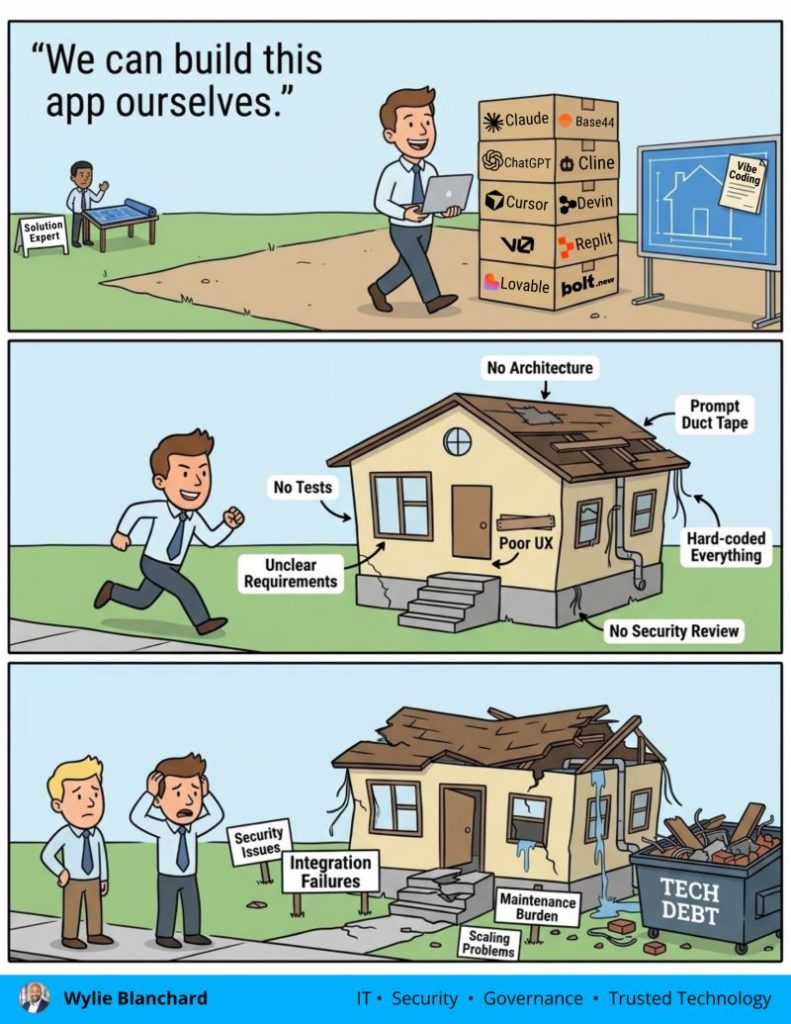
Originally shared on LinkedIn, expanded here with additional context and practical next steps.